YAS YetAnotherShop v1.5.0 · v7.88 · Hytale 0.5

Native Hytale Shops · Update 5 · ServerShops · PlayerShops · ShopBlocks

Native Hytale shops · Update 5 · server shops · player shops · shop blocks

YetAnotherShop Dokumentation für Spieler, Admins und Entwickler.

YetAnotherShop documentation for players, admins, and developers.

Diese Dokumentation ist gegen Pre-YetAnotherShop v7.88 geprüft. Sie beschreibt die aktuelle Bedienung, Commands, Konfiguration, optionale Provider und die öffentliche API für Hytale Update 5.

This documentation is checked against Pre-YetAnotherShop v7.88. It covers current usage, commands, configuration, optional providers, and the public API for Hytale Update 5.

Überblick

Overview

Was YetAnotherShop aktuell abdeckt

What YetAnotherShop currently covers

YetAnotherShop ist ein natives Hytale-Shop-System mit ServerShops, PlayerShops, physischen ShopBlocks, Item- und Währungszahlungen, YASCurrency-Bargeld, Buy Orders, Bestand, Restock, Regeln, Kauf-Limits, Kategorien, Map-Markern und optionalen Integrationen.

YetAnotherShop is a native Hytale shop system with server shops, player shops, physical shop blocks, item and currency payments, YASCurrency cash, buy orders, stock, restock, rules, purchase limits, categories, map markers, and optional integrations.

Spieler

Players

Öffnen Shops über NPCs, HyCitizens, ShopBlocks, Container oder Commands, kaufen Angebote und bestätigen Mengen bei PlayerShops.

Open shops through NPCs, HyCitizens, shop blocks, containers, or commands, buy offers, and confirm quantities in player shops.

PlayerShops

Spieler erstellen eigene Shops, Angebote, Outputs, Preise, Zahlungsoptionen, Kategorien und holen Einnahmen ab.

Players create their own shops, offers, outputs, prices, payment options, categories, and claim earnings.

ServerShops

Admins bauen zentrale Shops mit Stock, Restock, Regeln, Quest-Produkten, Limits, Links und physischen ShopBlocks.

Admins build central shops with stock, restock, rules, quest products, limits, links, and physical shop blocks.

Integrationen

Integrations

VaultUnlocked, Ecotale, YASCurrency, QuestLines, MMOSkillTree, RPGLeveling und HyCitizens sind optional.

VaultUnlocked, Ecotale, YASCurrency, QuestLines, MMOSkillTree, RPGLeveling, and HyCitizens are optional.

Version und Hytale-Kompatibilität

Version and Hytale compatibility

Die Mod-Manifest-Version ist 1.5.0 und richtet sich an ServerVersion >=0.5.0-pre.0 <0.6.0. Das Maven-Projekt nutzt Java 25 und Hytale Server pre-release-local bzw. das Release-Profil für 2026.03.26-89796e57b.

The mod manifest version is 1.5.0 and targets ServerVersion >=0.5.0-pre.0 <0.6.0. The Maven project uses Java 25 and Hytale Server pre-release-local, or the release profile for 2026.03.26-89796e57b.
Aktuelle Commands

Current commands

Befehle in v7.88

Commands in v7.88

/yetanothershop

Aliase:Aliases: /yas, /shoptest

Öffnet die normale Shop-Übersicht bzw. den Standard-Shop-Einstieg.

Opens the normal shop overview or default shop entry.

/yetanothershop <shopSlug>

Alias:Alias: /yas <shopSlug>

Öffnet einen aktiven ServerShop per Slug, sofern der Shop nicht als Link-only gesperrt ist.

Opens an active server shop by slug if the shop is not blocked as link-only.

/yetanothershop myshop

Aliase:Aliases: /yas myshop, /yas myshops, /yas shop

Öffnet die Verwaltung eigener PlayerShops.

Opens management for the player's own player shops.

/yetanothershopadmin

Aliase:Aliases: /yasadmin, /yasa

Öffnet die globale Admin-Oberfläche. Benötigt yetanothershop.admin.

Opens the global admin UI. Requires yetanothershop.admin.

Wichtig: Verlinkte Shops können absichtlich nicht per Slug/Command geöffnet werden. Für ShopBlocks, Container, NPCs und HyCitizens ist die verlinkte Interaktion der gewünschte Weg.

Important: Linked shops may intentionally not open by slug/command. For shop blocks, containers, NPCs, and HyCitizens, the linked interaction is the intended flow.

Endnutzer-Dokumentation

End-user documentation

Shops benutzen und eigene PlayerShops verwalten

Using shops and managing your own player shops

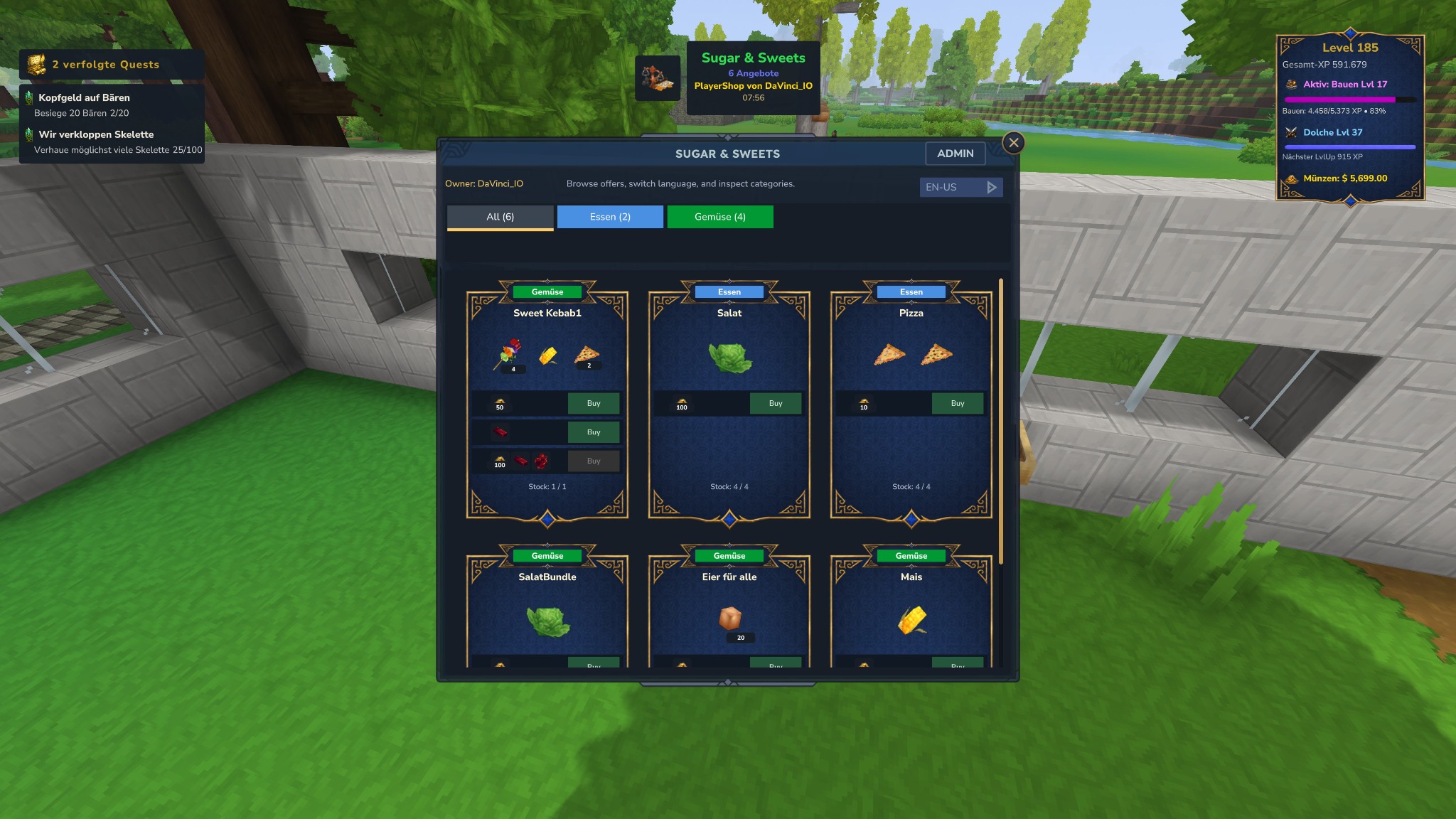
Shop page with categories and offers
Runtime-Shop mit Kategorien, Angebotskarten, Bestand und Zahlungsoptionen.
Runtime shop with categories, offer cards, stock, and payment options.

Spieler-Workflow

Player workflow

  1. Shop über NPC, HyCitizen, ShopBlock, Container, Map-Hinweis oder /yas öffnen.
  2. Open a shop through an NPC, HyCitizen, shop block, container, map hint, or /yas.
  3. Kategorie wählen und Angebot prüfen: Output, Kosten, Bestand, Buy-Button und Regeln.
  4. Select a category and check the offer: output, costs, stock, buy button, and rules.
  5. Bei PlayerShops wird bei Bedarf ein Mengendialog angezeigt. Der Server validiert Menge, Bestand, Kosten, Inventarplatz und Limits erneut.
  6. For player shops, a quantity dialog appears when needed. The server revalidates amount, stock, costs, inventory space, and limits.

Digitale Währung

Digital currency

Zahlungen laufen über den aktiven Economy-Provider wie VaultUnlocked, Ecotale oder YASCurrency. Shopbeträge sind ganze Einheiten.

Payments use the active economy provider such as VaultUnlocked, Ecotale, or YASCurrency. Shop amounts are whole units.

Physisches Bargeld

Physical cash

YASCurrency-Cash kann als Zahlungsoption verlangt werden. Größere Münzen/Scheine werden akzeptiert und Restgeld wird automatisch zurückgegeben.

YASCurrency cash can be required as a payment option. Larger coins/notes are accepted and change is returned automatically.

Item-Zahlung

Item payment

Shops können Items als Kosten verlangen. Der Kauf wird blockiert, wenn Items, Bestand oder Inventarplatz fehlen.

Shops can require items as costs. The purchase is blocked if items, stock, or inventory space are missing.

Regeln & Limits

Rules & limits

Angebote können Level, Quests, Regionen, Reputation, Kauf-Limits, Cooldowns und tägliche/wöchentliche/lifetime Limits verwenden.

Offers can use levels, quests, regions, reputation, purchase limits, cooldowns, and daily/weekly/lifetime limits.

PlayerShop erstellen

Create a player shop

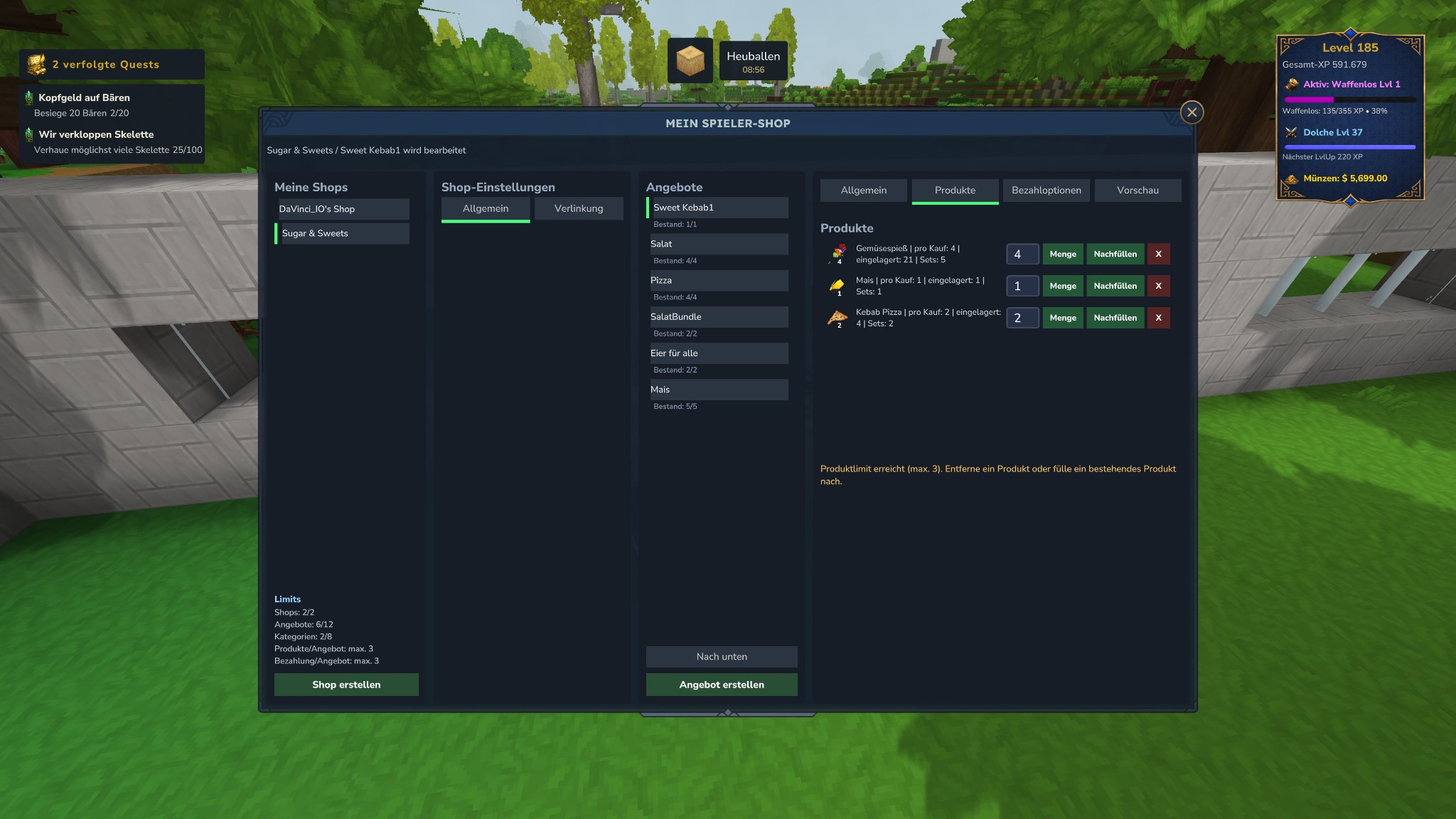
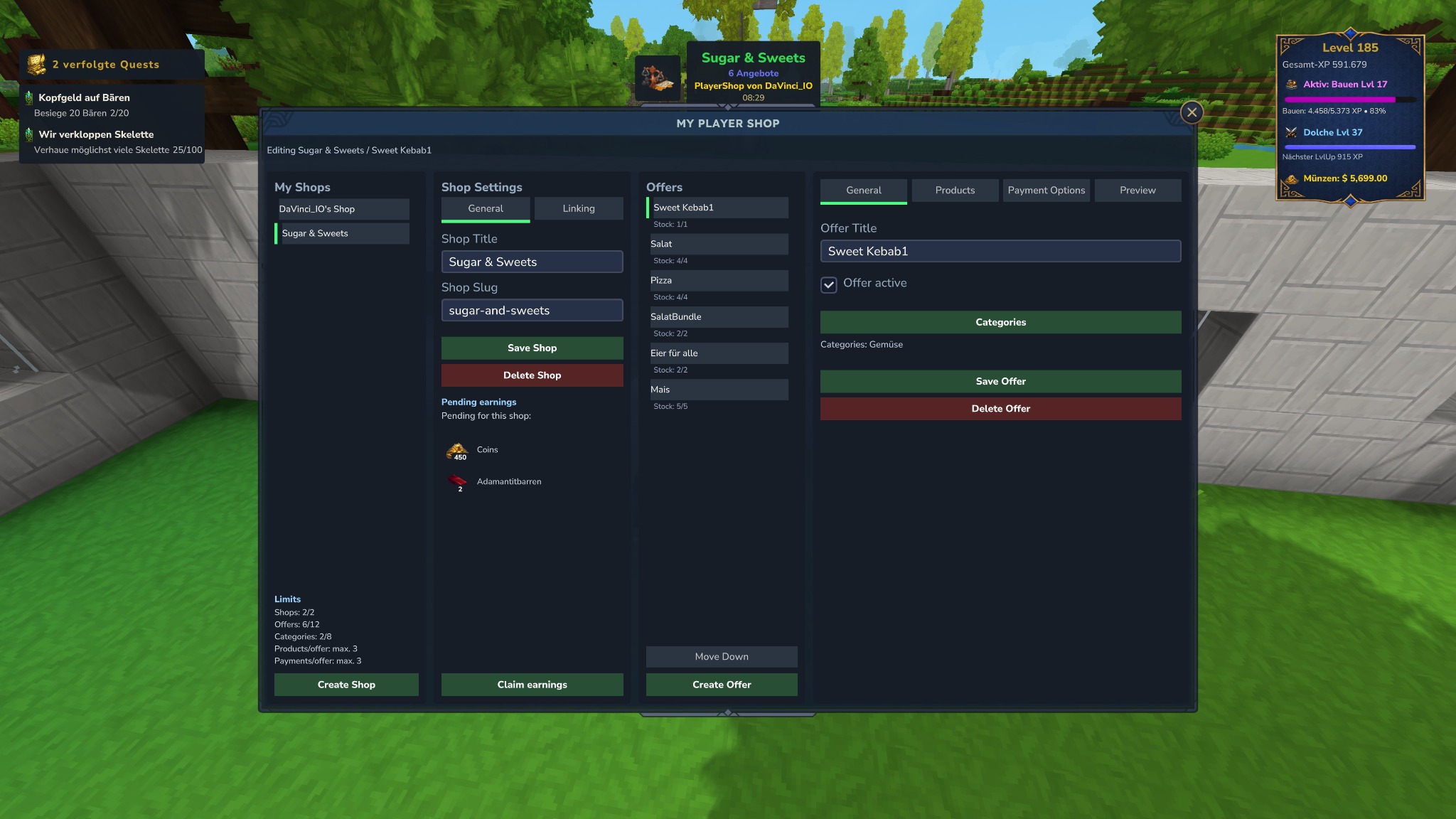
Player shop editor general tab
PlayerShop-Editor mit Shopliste, Shopname, Slug, Kategorien, Einnahmen und Links.
Player-shop editor with shop list, shop name, slug, categories, earnings, and links.
  1. /yas myshop öffnen und bei freien Limits Shop erstellen klicken.
  2. Open /yas myshop and click Create Shop if you have free limits.
  3. Shop-Titel, Slug und Aktiv-Status pflegen. Der Slug ist technische Identifikation und kann bei nicht verlinkten Shops für Commands genutzt werden.
  4. Set title, slug, and active state. The slug is technical identification and can be used for commands on non-linked shops.
  5. Produkte/Outputs aus deinem Inventar auswählen, Menge setzen und Bestand nachfüllen.
  6. Select products/outputs from your inventory, set the amount, and refill stock.
  7. Preis über digitale Währung, YASCurrency-Bargeld oder Item-Zahlung setzen. Buy Orders sind möglich, wenn der Server sie aktiviert hat.
  8. Set the price using digital currency, YASCurrency cash, or item payment. Buy orders are available if the server enables them.
  9. Einnahmen und Aktivitätsverlauf im Editor prüfen und offene Einnahmen abholen.
  10. Check earnings and activity history in the editor and claim pending earnings.

Admin-Dokumentation

Admin documentation

ServerShops, Limits, Provider und Links administrieren

Administer server shops, limits, providers, and links

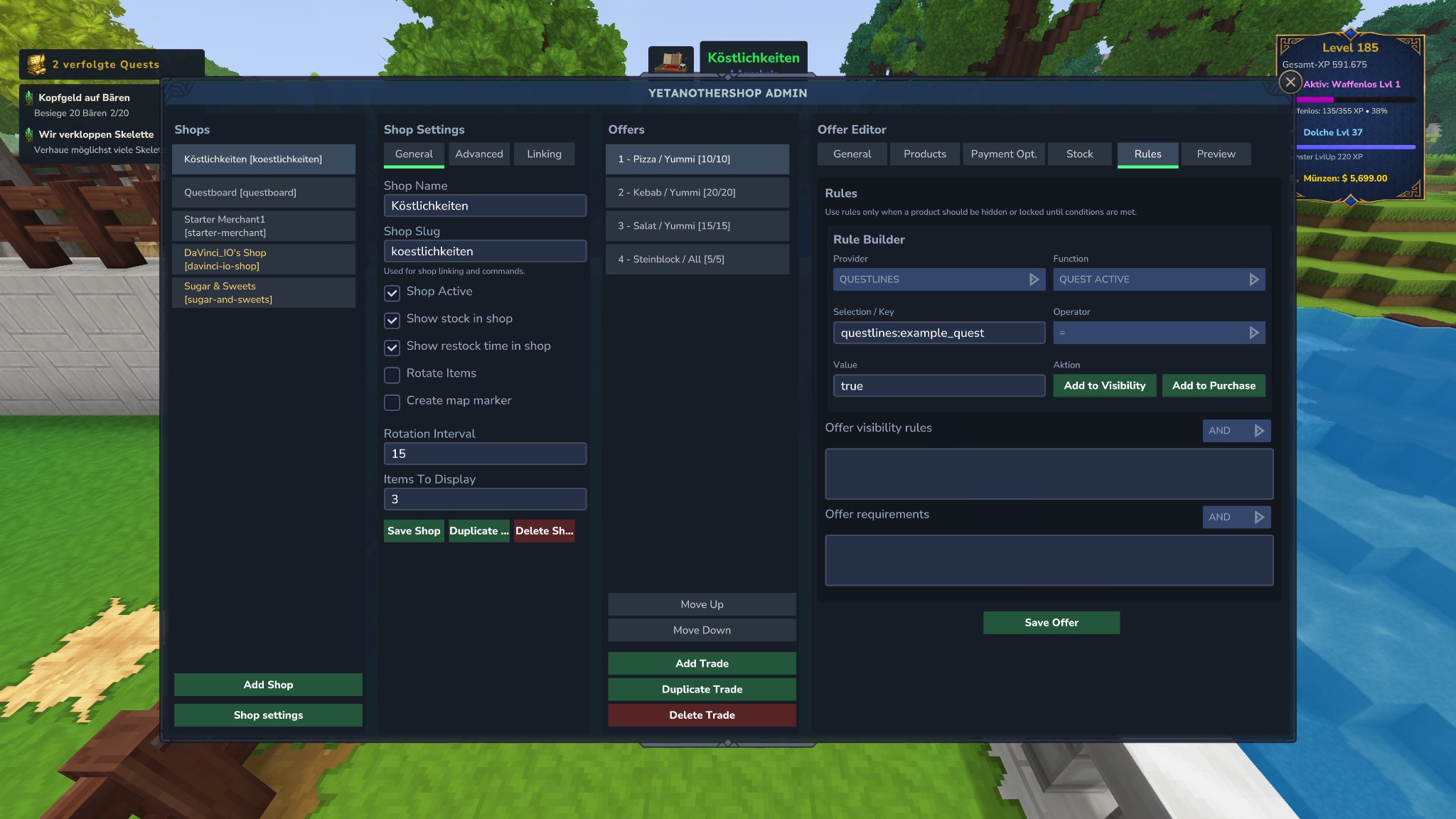
Admins öffnen die Oberfläche mit /yasadmin. Dort werden ServerShops, Angebote, Kategorien, Zahlungsoptionen, Bestand, Regeln, Limits, ShopBlocks und PlayerShop-Einstellungen gepflegt.

Admins open the interface with /yasadmin. It manages server shops, offers, categories, payment options, stock, rules, limits, shop blocks, and player-shop settings.

  • General: Shopname, Slug, Aktiv-Status, Stock-Anzeige, Restock-Anzeige, Rotation und Map-Marker.
  • General: shop name, slug, active state, stock display, restock display, rotation, and map marker.
  • Products: Outputs, Mengen und Quest-Produkte.
  • Products: outputs, amounts, and quest products.
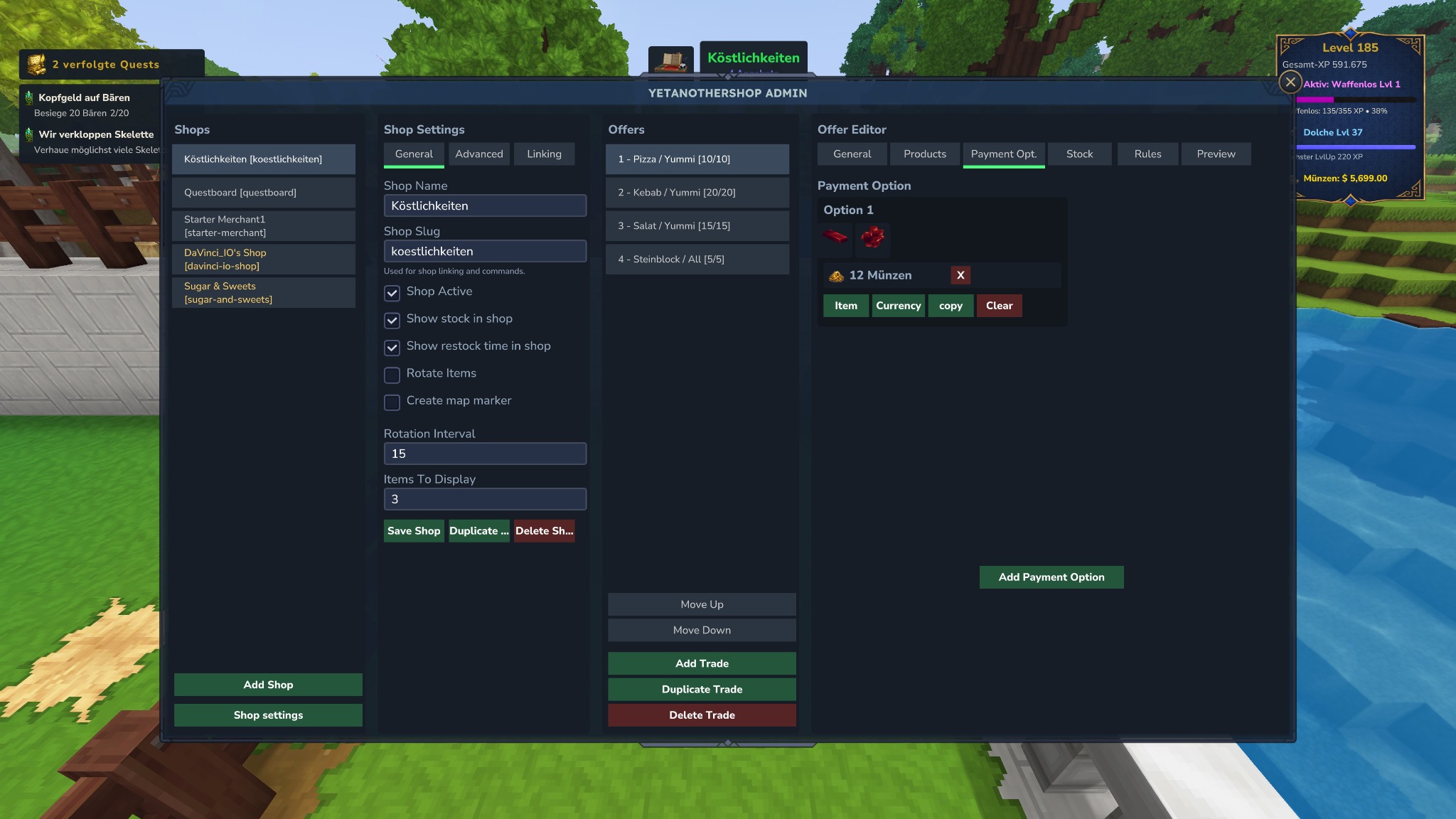
  • Payment options: Item-, digitale Currency- und YASCurrency-Cash-Kosten mit sichtbarer Konto/Bargeld-Unterscheidung.
  • Payment options: item, digital currency, and YASCurrency cash costs with visible account/cash distinction.
  • Rules & limits: Level, Quest, Region, Reputation, Kaufgrenzen und Cooldowns.
  • Rules & limits: level, quest, region, reputation, purchase caps, and cooldowns.
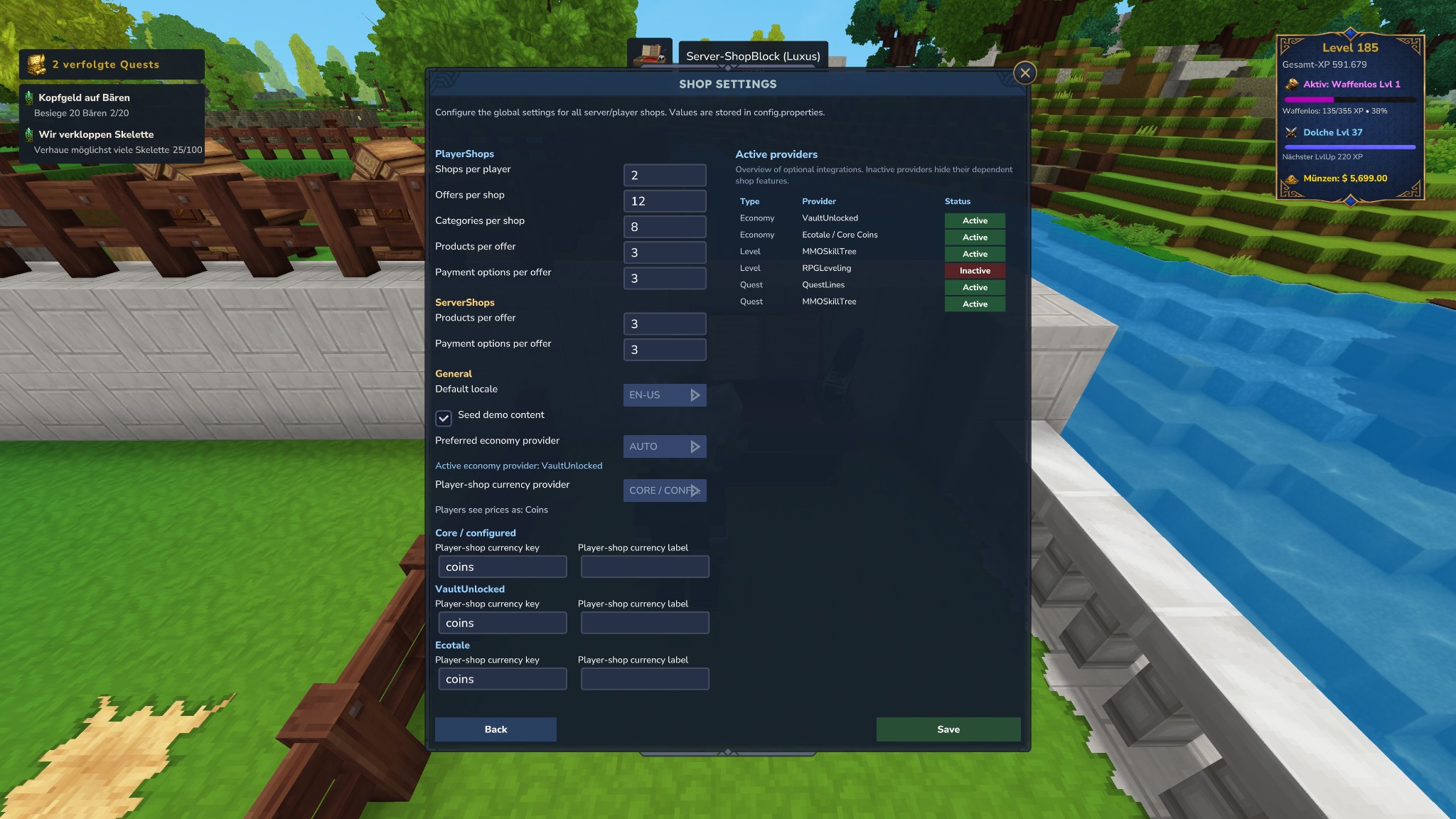
Admin global settings
Globale Einstellungen: Provider, Limits, Währung und optionale Integrationen.
Global settings: providers, limits, currency, and optional integrations.

ShopBlocks

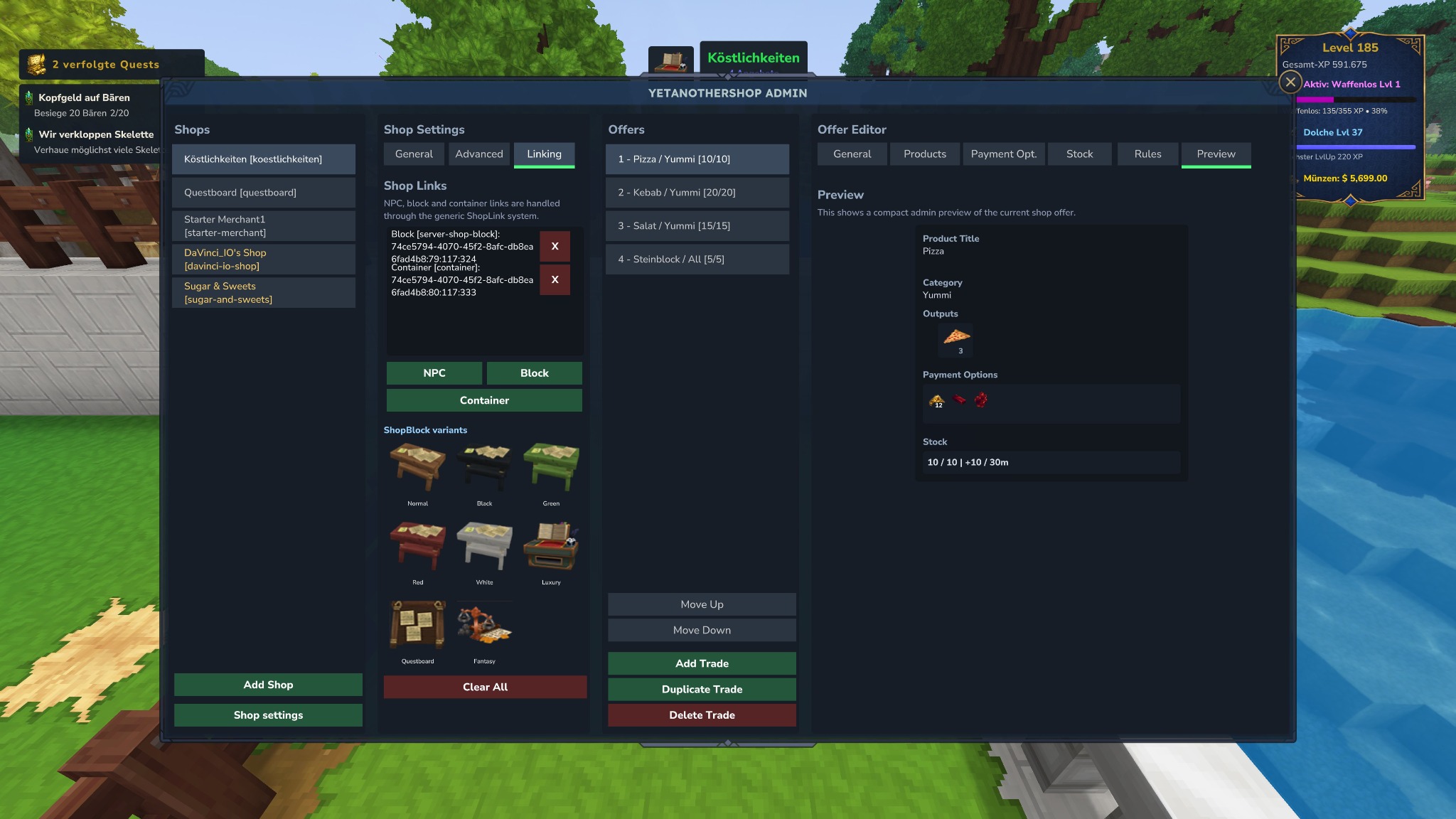
Server- und PlayerShops können physische ShopBlocks erhalten. Varianten: Normal, Black, Green, Red, White, Luxury, Fantasy und Questboard für ServerShops. Unlink/Cleanup löscht echte YAS-ShopBlocks ohne Drop, normale Container werden nur entlinkt.

Server and player shops can use physical shop blocks. Variants include Normal, Black, Green, Red, White, Luxury, Fantasy, and Questboard for server shops. Unlink/cleanup deletes real YAS shop blocks without drops; normal containers are only unlinked.

PlayerShop Limits

Admins konfigurieren Shops pro Spieler, Angebote, Buy Orders, Kategorien, Outputs pro Angebot, Zahlungsoptionen und Activity-History-Einträge.

Admins configure shops per player, offers, buy orders, categories, outputs per offer, payment options, and activity history entries.

Bücher & Papers

Books & papers

allowPlayerShopBooksAndPapersSales steuert, ob Bücher/Papers mit Custom-Metadaten über PlayerShops verkauft werden dürfen.

allowPlayerShopBooksAndPapersSales controls whether books/papers with custom metadata can be sold through player shops.

Generic Entity Linking

Generic entity linking

enableGenericEntityNpcLinking ist standardmäßig deaktiviert. HyCitizens, ShopBlocks und Container benötigen diesen globalen Fallback nicht.

enableGenericEntityNpcLinking is disabled by default. HyCitizens, shop blocks, and containers do not need this global fallback.

Optionale Provider

Optional providers

Integrationen in v7.88

Integrations in v7.88

VaultUnlocked

Economy-Provider vaultunlocked. Wird nur genutzt, wenn verfügbar; unterstützt Default-/Multi-Currency je nach externer API.

Economy provider vaultunlocked. Used only when available; supports default/multi-currency depending on the external API.

Ecotale / Core Coins

Economy-Provider ecotale für Core-Coin-/Economy-Zahlungen.

Economy provider ecotale for core-coin/economy payments.

YASCurrency

Economy-Provider yascurrency plus optionales physisches Cash. Cash-Zahlungen sind optional/reflection-basiert und funktionieren mit Restgeld.

Economy provider yascurrency plus optional physical cash. Cash payments are optional/reflection-based and support change.

QuestLines

Quest-Provider für Quest-Status, Flags, Start und Quest-Produkte. Prefix-Routing über questlines:.

Quest provider for quest status, flags, starting quests, and quest products. Prefix routing uses questlines:.

MMOSkillTree

Progression- und Quest-Provider. Prefixe mmo: und mmoskilltree:.

Progression and quest provider. Prefixes mmo: and mmoskilltree:.

RPGLeveling

Progression-Provider für Level-/Fortschrittsregeln.

Progression provider for level/progression rules.

HyCitizens

NPC-Linking für HyCitizens-Shops. Empfohlener Weg für NPC-Händler.

NPC linking for HyCitizens shops. Recommended path for NPC traders.

Map-Marker

Map markers

Shop-Map-Marker können für ServerShops aktiviert werden und werden beim Start/World-Join registriert.

Shop map markers can be enabled for server shops and are registered on startup/world join.

API-Referenz

API reference

Öffentliche YetAnotherShopAPI

Public YetAnotherShopAPI

Für Add-ons und externe Mods gilt: Nutze die API und die Records aus com.davinciio.yetanothershop.api.model. Interne Manager, Repositories und UI-Seiten sind Implementierungsdetails.

For add-ons and external mods: use the API and records from com.davinciio.yetanothershop.api.model. Internal managers, repositories, and UI pages are implementation details.

YetAnotherShopAPI api = YetAnotherShopPlugin.api();
YetAnotherShopAPI api2 = YetAnotherShopPlugin.getInstance().getApi();

Shop directory

getShops(), getServerShops(), getPlayerShops(), getPlayerShopsByOwner(UUID)

Lookup

findShopById(UUID), findShopBySlug(String), findPlayerShopByOwnerAndSlug(UUID,String), hasShop(UUID/String)

Details

getShopDisplayName(UUID/String), getOfferCount(UUID/String), getOffers(UUID), getCategories(UUID), getPlayerShopLimits()

Links

getLinks(UUID/String), findShopByLink(LinkTargetType,String), findShopByHyCitizenId(String), findShopByNpcReference(String), findShopByBlockReference(String), findShopByContainerReference(String), hasLinkedShop(LinkTargetType,String)

Open UI

openShop(PlayerRef, UUID), openShop(PlayerRef, String)

Beträge: Shop-Outputs, Kosten, Stock und Limits sind in der öffentlichen API ganzzahlig (int). Für Zahlungsbeträge und physisches Bargeld werden ganze Einheiten erwartet.

Amounts: shop outputs, costs, stock, and limits are integer-based (int) in the public API. Payment amounts and physical cash use whole units.

ShopView

UUID id
String slug
String displayName
boolean active
ShopKind kind // SERVER, PLAYER
String ownerPlayerId // nullable
String ownerName // nullable
int offerCount
List<String> categoryIds
boolean playerShop()

OfferView

UUID id
String title
String subtitle
String description
boolean active
ProductType productType // STANDARD, QUEST
int sortOrder
List<String> categoryIds
StockView stock
List<ShopOutputView> outputs
List<PaymentOptionView> paymentOptions

CategoryView

String id
String title
int sortOrder
String backgroundColor
String textColor
boolean visible

PaymentOptionView

String id
String title
int sortOrder
boolean visible
List<ShopCostView> costs

ShopCostView

String provider
String type // item, currency, cash
String key
int amount
boolean optional

ShopOutputView

String provider
String type
String key
int amount

StockView

boolean limited
int currentStock
int maxStock
boolean restockEnabled
int restockAmountPerCycle
long restockCycleSeconds

LinkView

UUID id
LinkTargetType targetType
String targetReference
boolean active
Map<String,String> metadata

ShopLimitsView

int maxPlayerShopsPerPlayer
int maxPlayerOffersPerShop
int maxPlayerBuyOrdersPerShop
int maxPlayerCategoriesPerShop
int maxPlayerOutputsPerOffer
int maxPlayerPaymentOptionsPerOffer

Code-Beispiele

Code examples

Typische Integrationsmuster

Common integration patterns

PlayerShops eines Owners lesen

Read player shops owned by a player

UUID ownerId = playerRef.getUuid();
List<ShopView> owned = api.getPlayerShopsByOwner(ownerId);
api.findPlayerShopByOwnerAndSlug(ownerId, "davinci-io-shop")
   .ifPresent(shop -> log(shop.displayName()));

Kosten prüfen

Inspect costs

for (OfferView offer : api.getOffers(shop.id())) {
    for (PaymentOptionView option : offer.paymentOptions()) {
        for (ShopCostView cost : option.costs()) {
            String type = cost.type(); // item, currency, cash
            int amount = cost.amount();
        }
    }
}

Shop per Link finden

Find a shop by link

Optional<ShopView> linked = api.findShopByBlockReference(blockReference);
boolean occupied = api.hasLinkedShop(LinkTargetType.CONTAINER, containerReference);

Shop öffnen

Open a shop

boolean opened = api.openShop(playerRef, "starter-merchant");
if (!opened) {
    // Missing shop, blocked policy, or player context unavailable.
}

Konfiguration

Configuration

config.properties Referenz

config.properties reference

Allgemein

General

defaultLocale, seedDemoContent

Standardsprache und Demo-Shop-Seeding.

Default language and demo shop seeding.

Economy

Economy

economyProvider=auto|vaultunlocked|ecotale|yascurrency

Aktiver Zahlungsprovider für ServerShops.

Active payment provider for server shops.

PlayerShop Currency

playerShopCurrencyProvider, playerShopCurrencyKey, playerShopCurrencyLabel, playerShopCurrency.vaultunlocked.*, playerShopCurrency.ecotale.*

Limits

Limits

maxServerPaymentOptionsPerOffer, maxServerOutputsPerOffer, maxPaymentItems, maxPlayerShopsPerPlayer, maxPlayerOffersPerShop, maxPlayerBuyOrdersPerShop, maxPlayerCategoriesPerShop, maxPlayerOutputsPerOffer, maxPlayerPaymentOptionsPerOffer

PlayerShop Sicherheit

Player-shop safety

enablePlayerShopBuyOrders, allowPlayerShopBooksAndPapersSales, maxHistoryEntriesPerShop

Entity-Linking

Entity linking

enableGenericEntityNpcLinking=false

Standardmäßig aus. HyCitizens, ShopBlocks und Container bleiben aktiv.

Disabled by default. HyCitizens, shop blocks, and containers remain active.

Screenshots

Screenshots

UI-Galerie

UI gallery

Global settings
Globale Einstellungen und Provider-Status.
Global settings and provider status.
Player shop general settings
PlayerShop Allgemein.
Player-shop general.
Player shop products
Produkte, Outputs und Refill.
Products, outputs, and refill.
Payment options
Zahlungsoptionen.
Payment options.
Shop blocks
Verlinkung und ShopBlock-Varianten.
Linking and shop-block variants.
Rule builder
Rule Builder.
Rule builder.